Battery drain: usage and recurring conditions
Open task Build a comparable app-use record before attributing short runtime to the battery.
Device evidence task · Pixel 7
Compare front/rear capture in the Pixel Camera app before attributing a third-party app problem to hardware.
Planning estimate for recording observations; excludes charging, backups, drying and service. Not a measured repair time.
Enable JavaScript to record observations. The complete preparation guide is available below.
Remove a case blocking the lens and gently wipe back glass with a soft clean cloth. Use a well-lit subject with the phone cool.
Source: Fix Pixel Camera app · Shutter delay: check device
In Pixel Camera, compare front and rear preview and a saved photo. If only another app fails, keep that result separate.
Source: Fix Pixel Camera app · Third-party app tip; Selfie camera
Press Power with Volume up to show the menu, choose Restart and repeat the affected camera path.
Source: Turn your Pixel phone on and off · Restart: Pixel 6 and later
If needed, hold Camera’s app icon → App info → Storage & cache → Clear cache. Use cache only; then repeat the same camera test.
Source: Fix Pixel Camera app · Step 2: Clear Camera cache
Review Pixel Camera updates in Play Store → Manage apps & devices. After any chosen update, repeat the same front/rear comparison.
Source: Fix Pixel Camera app · Step 3: Update apps
For shutter delay, check timer/flash settings and compare in good light. If selfie preview works but switching cameras fails, retain that distinction for Google support.
Source: Fix Pixel Camera app · Try selfie camera; Check Camera settings
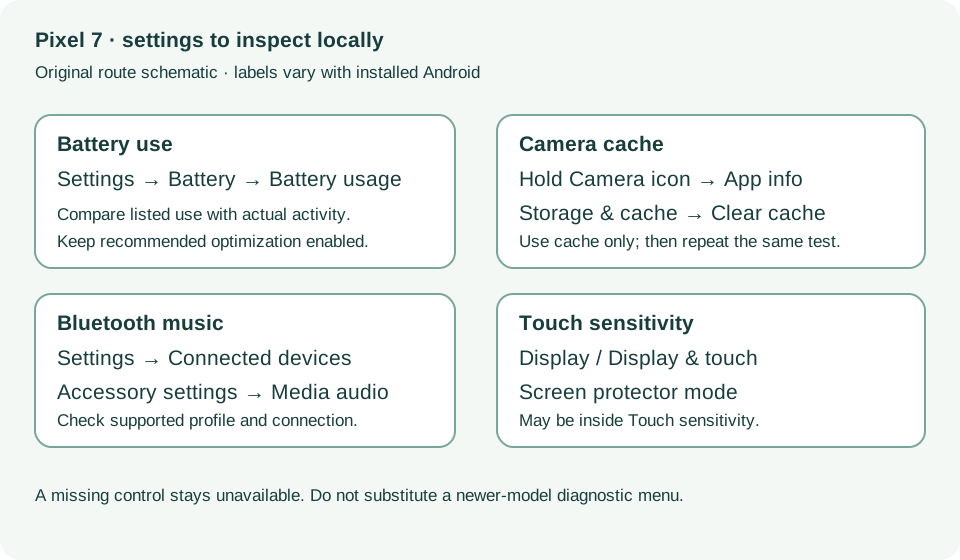
General troubleshooting steps 1–3; Selfie camera; Shutter delay · Checked 2026-10-13
Cache-only cleanup, camera comparisons and lighting
Reference only. Bounded original paraphrase and original schematics; no copied support images or pages.
Pixel 6 and later; Restart · Checked 2026-10-13
Power plus Volume up for Pixel 7 normal power menu
Reference only. Bounded original paraphrase and original schematics; no copied support images or pages.
Safety warnings; Repair and service; Charging · Checked 2026-10-13
Model-specific damaged-device and charging safety
Reference only. Bounded original paraphrase and original schematics; no copied support images or pages.
Learn how it works; Access; Exit · Checked 2026-10-13
Android 14 December 2023+, 2 GB, backups, possible reset and credential privacy
Reference only. Bounded original paraphrase and original schematics; no copied support images or pages.
Battery diagnostics; Battery usage; Updates; Still have issues · Checked 2026-10-13
App-use review, optimization and post-update context
Reference only. Bounded original paraphrase and original schematics; no copied support images or pages.
Bluetooth basics; Cannot hear music; Cannot make or get calls · Checked 2026-10-13
Connected versus saved, media and phone audio profiles
Reference only. Bounded original paraphrase and original schematics; no copied support images or pages.
Check screen; Pixel 8a and earlier · Checked 2026-10-13
Screen protector mode and app-specific touch comparison; excludes Pixel 9 diagnostics
Reference only. Bounded original paraphrase and original schematics; no copied support images or pages.
Original preparation workflow based on the linked documents. No hands-on device repair testing is claimed.