Battery drain: usage and recurring conditions
Open task Build a comparable app-use record before attributing short runtime to the battery.
Device evidence task · Pixel 7
Separate accessory discovery and connection from media and phone-audio profiles.
Planning estimate for recording observations; excludes charging, backups, drying and service. Not a measured repair time.
Enable JavaScript to record observations. The complete preparation guide is available below.
Follow the accessory’s discovery instructions. Toggle phone Bluetooth off/on and distinguish a saved device from an actively connected device.
Source: Fix Pixel Bluetooth problems · Step 1; Cannot pair with accessories
Restart the phone through Power + Volume up → Restart and restart the accessory normally if needed. Keep other paired devices from taking the audio.
Source: Fix Pixel Bluetooth problems · Bluetooth basics; other devices playing music
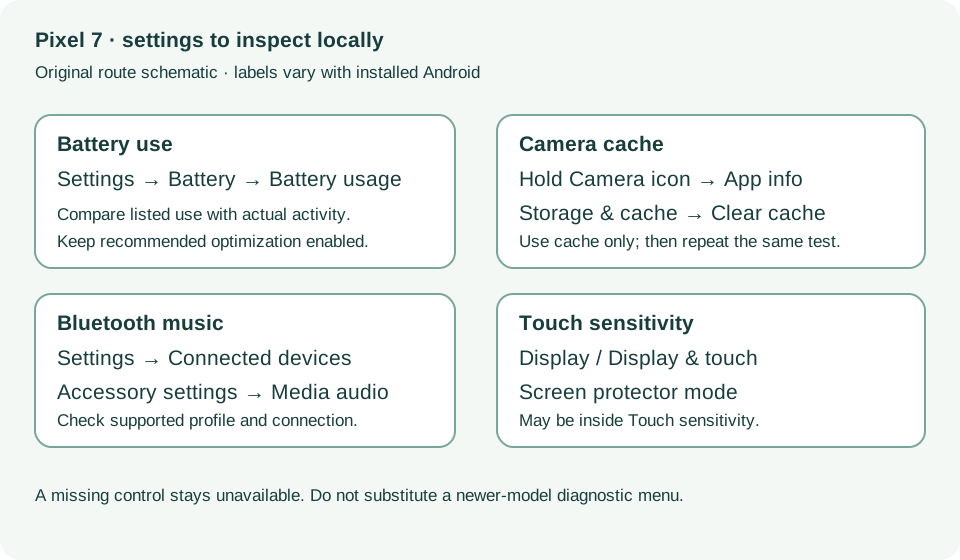
In Settings → Connected devices, open the accessory settings and check Media audio, if the accessory supports music. Play the same local track at a comfortable level.
Source: Fix Pixel Bluetooth problems · Cannot hear music
For an accessory that supports calls, inspect Phone audio separately. A working music path does not establish call support.
Source: Fix Pixel Bluetooth problems · Cannot make or get calls
If available, compare another owned media accessory with the same track. Keep car-manual limitations and accessory-specific failures in the record; no optional diagnostic upload is required.
Source: Fix Pixel Bluetooth problems · Music capability; still have Bluetooth issues
Bluetooth basics; Cannot hear music; Cannot make or get calls · Checked 2026-10-13
Connected versus saved, media and phone audio profiles
Reference only. Bounded original paraphrase and original schematics; no copied support images or pages.
Pixel 6 and later; Restart · Checked 2026-10-13
Power plus Volume up for Pixel 7 normal power menu
Reference only. Bounded original paraphrase and original schematics; no copied support images or pages.
Safety warnings; Repair and service; Charging · Checked 2026-10-13
Model-specific damaged-device and charging safety
Reference only. Bounded original paraphrase and original schematics; no copied support images or pages.
Learn how it works; Access; Exit · Checked 2026-10-13
Android 14 December 2023+, 2 GB, backups, possible reset and credential privacy
Reference only. Bounded original paraphrase and original schematics; no copied support images or pages.
Battery diagnostics; Battery usage; Updates; Still have issues · Checked 2026-10-13
App-use review, optimization and post-update context
Reference only. Bounded original paraphrase and original schematics; no copied support images or pages.
General troubleshooting steps 1–3; Selfie camera; Shutter delay · Checked 2026-10-13
Cache-only cleanup, camera comparisons and lighting
Reference only. Bounded original paraphrase and original schematics; no copied support images or pages.
Check screen; Pixel 8a and earlier · Checked 2026-10-13
Screen protector mode and app-specific touch comparison; excludes Pixel 9 diagnostics
Reference only. Bounded original paraphrase and original schematics; no copied support images or pages.
Original preparation workflow based on the linked documents. No hands-on device repair testing is claimed.