Battery drain: usage and recurring conditions
Open task Build a comparable app-use record before attributing short runtime to the battery.
Device evidence task · Pixel 7
Record intermittent missed touches while comparing Pixel 7 screen coverings and the available sensitivity setting.
Planning estimate for recording observations; excludes charging, backups, drying and service. Not a measured repair time.
Enable JavaScript to record observations. The complete preparation guide is available below.
Choose one simple action such as opening Settings. Record whether missed touches occur there and in the affected app, or only inside one app.
Source: Fix touch and response issues on Pixel · App-specific touch issue; Check phone screen
Use clean bare fingers and a clean screen. Remove a case obstructing the edge if safe. Do not press on damaged glass.
Source: Fix touch and response issues on Pixel · Check screen: case, gloves, stickers, clean screen
If acceptable and safe, compare without the screen protector. Google notes a removed protector might not be reusable; leave this row untested if you retain it.
Source: Fix touch and response issues on Pixel · Try removing case or protector
For Pixel 7, review Screen protector mode in the installed Display/Display & touch settings. Current guidance places it under Touch sensitivity. Record its initial state, compare once and restore the preference you need.
Source: Fix touch and response issues on Pixel · Pixel 8a and earlier: Screen protector mode
Log a later naturally occurring missed touch with the same app and covering condition. Persistent app-only trouble goes to the developer; trouble across controls goes to Google.
Source: Fix touch and response issues on Pixel · App-specific issue; support
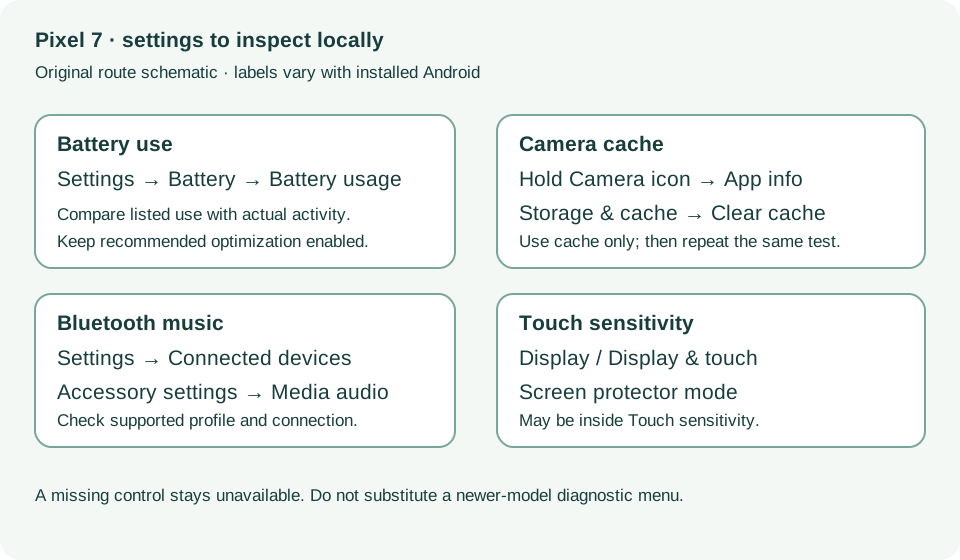
Check screen; Pixel 8a and earlier · Checked 2026-10-13
Screen protector mode and app-specific touch comparison; excludes Pixel 9 diagnostics
Reference only. Bounded original paraphrase and original schematics; no copied support images or pages.
Safety warnings; Repair and service; Charging · Checked 2026-10-13
Model-specific damaged-device and charging safety
Reference only. Bounded original paraphrase and original schematics; no copied support images or pages.
Learn how it works; Access; Exit · Checked 2026-10-13
Android 14 December 2023+, 2 GB, backups, possible reset and credential privacy
Reference only. Bounded original paraphrase and original schematics; no copied support images or pages.
Battery diagnostics; Battery usage; Updates; Still have issues · Checked 2026-10-13
App-use review, optimization and post-update context
Reference only. Bounded original paraphrase and original schematics; no copied support images or pages.
General troubleshooting steps 1–3; Selfie camera; Shutter delay · Checked 2026-10-13
Cache-only cleanup, camera comparisons and lighting
Reference only. Bounded original paraphrase and original schematics; no copied support images or pages.
Bluetooth basics; Cannot hear music; Cannot make or get calls · Checked 2026-10-13
Connected versus saved, media and phone audio profiles
Reference only. Bounded original paraphrase and original schematics; no copied support images or pages.
Original preparation workflow based on the linked documents. No hands-on device repair testing is claimed.