Backup readiness and a recoverable sample
Open task Verify data coverage before service could affect startup storage.
Service handoff pack · MacBook Air M1
Connect data protection to keyboard, audio and post-service checks without assuming a generic repair preparation setting.
Planning estimate for assembling existing evidence; excludes testing, backup and service.
Enable JavaScript to record observations. The complete preparation guide is available below.
Save observations in each relevant task. Return here to include their records in one export; untouched tasks remain “not started”.
Verify data coverage before service could affect startup storage.
Separate wrong characters, delayed keys and complete input loss with a local sample.
Compare selected output and local playback before a speaker service request.
Compare the returned Mac with the original complaint while retaining the earlier backup.
Verify accessible data: Use the existing backup method and confirm completion or selected copied files. Record inaccessible information rather than claiming a backup was made. Keep encryption passwords and recovery secrets separately.
Source: How to back up your Mac; Mac does not respond to key presses; No sound from Mac speakers · Preparation pack synthesis of the linked manufacturer tasks; individual operations retain their task-specific source sections.
Agree on the service scope: Follow the official instructions for the actual installed OS and provider. Retain a baseline input and built-in speaker observation. Discuss data-changing work before giving consent to the provider.
Source: How to back up your Mac; Mac does not respond to key presses; No sound from Mac speakers · Preparation pack synthesis of the linked manufacturer tasks; individual operations retain their task-specific source sections.
Check the return: Read the service summary and verify expected data access privately. Recheck the same keyboard input source and audio output. Keep the earlier backup until return checks are complete.
Source: How to back up your Mac; Mac does not respond to key presses; No sound from Mac speakers · Preparation pack synthesis of the linked manufacturer tasks; individual operations retain their task-specific source sections.
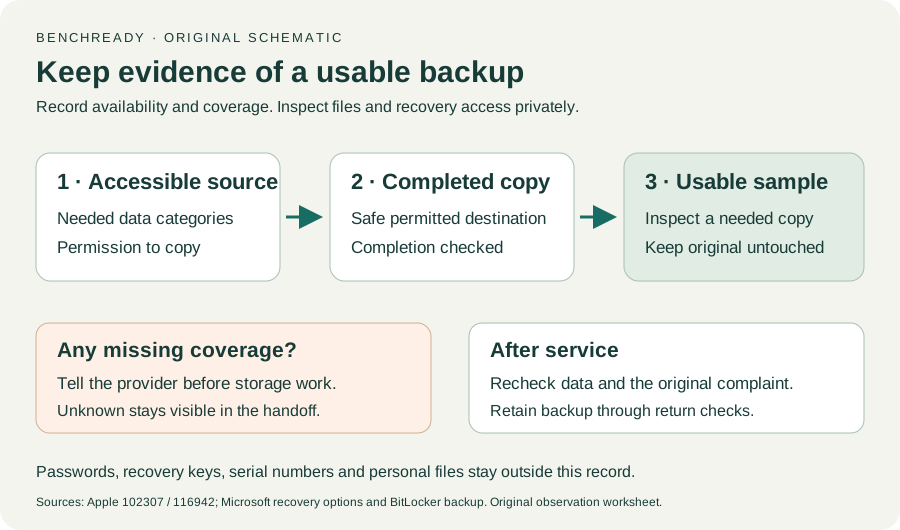
Time Machine / iCloud / Other backup methods · Checked 2026-10-13
Backup methods and data recovery purpose; original sample/coverage worksheet
Reference only. Original paraphrase and observation worksheets; no copied images or manual pages.
Built-in keyboard / Other keys · Checked 2026-10-13
Low battery, Slow Keys, Mouse Keys and input layout
Reference only. Original paraphrase and observation worksheets; no copied images or manual pages.
Opening / Built-in speakers / External outputs · Checked 2026-10-13
App volume, local source and selected built-in output
Reference only. Original paraphrase and observation worksheets; no copied images or manual pages.
Find model / MacBook Air M1 2020 · Checked 2026-10-04
Model and chip confirmation
Reference only. Original paraphrase; no copied images or manual pages.
Charging and Expansion / Display Support · Checked 2026-10-13
Two USB-C Thunderbolt/USB4 ports and one native external display up to 6K at 60 Hz
Reference only. Original paraphrase and observation worksheets; no copied images or manual pages.
Prepare / Apple silicon / Run Apple Diagnostics / Results · Checked 2026-10-13
M1 Options then Command-D; Tahoe 26+ selected tests versus earlier automatic testing; preserve reference code
Reference only. Original paraphrase and observation worksheets; no copied images or manual pages.
Original preparation workflow based on the linked documents. No hands-on device repair testing is claimed.