Apple Diagnostics with the right macOS branch
Open task Capture an Apple silicon diagnostic result and identify exactly which tests ran.
Device evidence task · MacBook Air M1
Verify data coverage before service could affect startup storage.
Planning estimate for recording observations; excludes charging, backups, drying and service. Not a measured repair time.
Enable JavaScript to record observations. The complete preparation guide is available below.
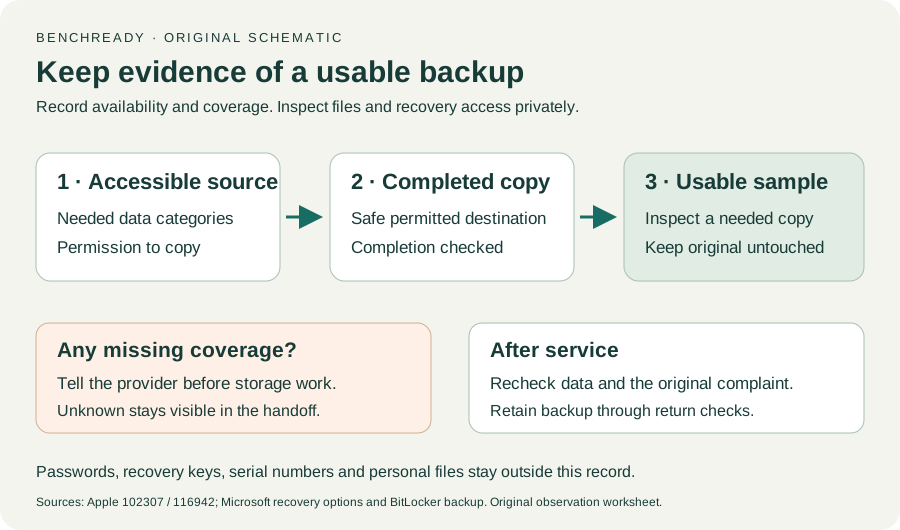
Choose the data that must survive service. Record whether the existing method is Time Machine, selected copies or synchronization. Method selection alone does not verify coverage.
Source: How to back up your Mac · Time Machine / iCloud / other methods; original coverage worksheet
Use the existing backup setup or an approved copy destination. If setup proposes erasing a disk containing needed files, pause and obtain a safe destination.
Source: How to back up your Mac · Backup methods; conservative destination guard
Wait for completion, then inspect a needed item through the backup tool or open a representative copy without replacing the original. Record availability, not file contents.
Source: How to back up your Mac · Backup and recovery purpose; original non-destructive verification
Record incomplete coverage and inaccessible source files as unverified. Confirm backup credentials are privately available without entering them here.
Source: How to back up your Mac; Get your Mac ready for service · Backup purpose / Make a backup; original gap checklist
Explain verified coverage and remaining data risk to the provider. Apple states that service may require erasing or replacing startup storage.
Source: Get your Mac ready for service · 1. Make a backup
Time Machine / iCloud / Other backup methods · Checked 2026-10-13
Backup methods and data recovery purpose; original sample/coverage worksheet
Reference only. Original paraphrase and observation worksheets; no copied images or manual pages.
Make a backup / Arrange service / Check settings · Checked 2026-10-13
Data may be erased or storage replaced; actual-OS service requirements; original post-service acceptance worksheet
Reference only. Original paraphrase and observation worksheets; no copied images or manual pages.
Handling / Built-in battery / Charging · Checked 2026-10-13
General damaged-equipment and moisture safety only; M1-specific connections are sourced from mac-spec
Reference only. Original paraphrase and observation worksheets; no copied images or manual pages.
Find model / MacBook Air M1 2020 · Checked 2026-10-04
Model and chip confirmation
Reference only. Original paraphrase; no copied images or manual pages.
Charging and Expansion / Display Support · Checked 2026-10-13
Two USB-C Thunderbolt/USB4 ports and one native external display up to 6K at 60 Hz
Reference only. Original paraphrase and observation worksheets; no copied images or manual pages.
Prepare / Apple silicon / Run Apple Diagnostics / Results · Checked 2026-10-13
M1 Options then Command-D; Tahoe 26+ selected tests versus earlier automatic testing; preserve reference code
Reference only. Original paraphrase and observation worksheets; no copied images or manual pages.
Recovery key purpose / Backup methods · Checked 2026-10-13
Owner/IT recovery availability before hardware service; no key input
Reference only. Original paraphrase and observation worksheets; no copied images or manual pages.
Before recovery: back up data · Checked 2026-10-13
Backup before data-affecting work; original non-destructive sample check
Reference only. Original paraphrase and observation worksheets; no copied images or manual pages.
Original preparation workflow based on the linked documents. No hands-on device repair testing is claimed.