Apple Diagnostics with the right macOS branch
Open task Capture an Apple silicon diagnostic result and identify exactly which tests ran.
Device evidence task · MacBook Air M1
Compare the returned Mac with the original complaint while retaining the earlier backup.
Planning estimate for recording observations; excludes charging, backups, drying and service. Not a measured repair time.
Enable JavaScript to record observations. The complete preparation guide is available below.
Read the service summary and ask what was tested or changed. Record only summary availability; keep invoices, serial number and personal details private.
Source: Get your Mac ready for service · Arrange for service; original return-acceptance worksheet
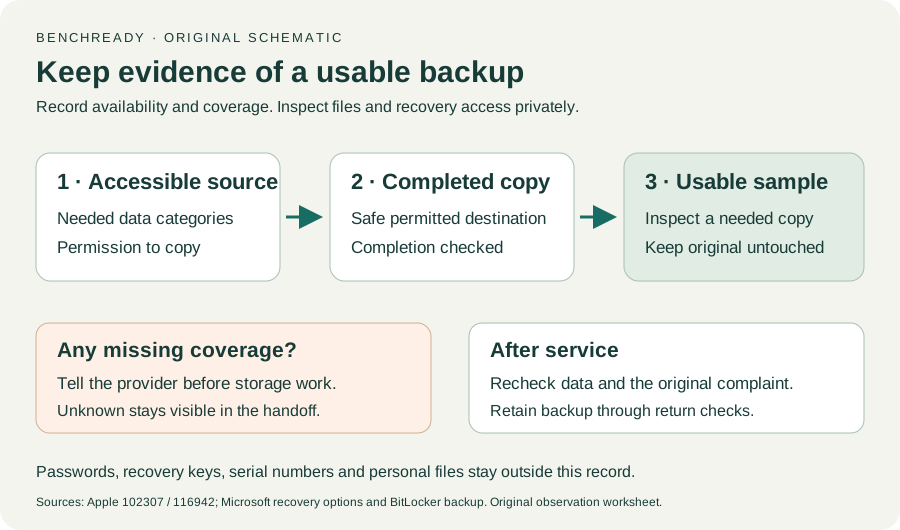
Confirm normal owner sign-in and a needed file locally. If data is missing, retain the backup and ask the provider about the agreed recovery plan before more changes.
Source: How to back up your Mac; Get your Mac ready for service · Recovery purpose / storage erasure possibility; original return check
Recreate the original safe complaint condition with the same accessory, action and power path. Record absent, present or intermittent behavior.
Source: Get your Mac ready for service · Service context; original complaint comparison
Compare a related built-in function without the affected accessory. Keep this limited acceptance check separate from the provider’s broader service scope.
Source: Get your Mac ready for service · Service context; original baseline worksheet
Retain the backup until needed data and the complaint have been reviewed. Follow exact macOS/provider instructions for any repair-completion or account-setting prompt.
Source: Get your Mac ready for service; How to back up your Mac · Check your settings / backup purpose; original retention decision
Make a backup / Arrange service / Check settings · Checked 2026-10-13
Data may be erased or storage replaced; actual-OS service requirements; original post-service acceptance worksheet
Reference only. Original paraphrase and observation worksheets; no copied images or manual pages.
Time Machine / iCloud / Other backup methods · Checked 2026-10-13
Backup methods and data recovery purpose; original sample/coverage worksheet
Reference only. Original paraphrase and observation worksheets; no copied images or manual pages.
Handling / Built-in battery / Charging · Checked 2026-10-13
General damaged-equipment and moisture safety only; M1-specific connections are sourced from mac-spec
Reference only. Original paraphrase and observation worksheets; no copied images or manual pages.
Find model / MacBook Air M1 2020 · Checked 2026-10-04
Model and chip confirmation
Reference only. Original paraphrase; no copied images or manual pages.
Charging and Expansion / Display Support · Checked 2026-10-13
Two USB-C Thunderbolt/USB4 ports and one native external display up to 6K at 60 Hz
Reference only. Original paraphrase and observation worksheets; no copied images or manual pages.
Prepare / Apple silicon / Run Apple Diagnostics / Results · Checked 2026-10-13
M1 Options then Command-D; Tahoe 26+ selected tests versus earlier automatic testing; preserve reference code
Reference only. Original paraphrase and observation worksheets; no copied images or manual pages.
Recovery key purpose / Backup methods · Checked 2026-10-13
Owner/IT recovery availability before hardware service; no key input
Reference only. Original paraphrase and observation worksheets; no copied images or manual pages.
Before recovery: back up data · Checked 2026-10-13
Backup before data-affecting work; original non-destructive sample check
Reference only. Original paraphrase and observation worksheets; no copied images or manual pages.
Original preparation workflow based on the linked documents. No hands-on device repair testing is claimed.