Wired charging: cable, adapter and outlet
Open task Identify which external charging condition changes the response before arranging service.
Device evidence task · iPhone 13
Record whether the iPhone reaches a logo, a low-battery screen or normal startup without recovery or erasure.
Planning estimate for recording observations; excludes charging, backups, drying and service. Not a measured repair time.
Enable JavaScript to record observations. The complete preparation guide is available below.
Record the current screen state before pressing buttons: entirely blank, low battery, Apple logo or responsive screen. Use a normal restart if the phone responds.
Source: If your iPhone will not turn on or the screen is black · If screen is black; Face ID models
For a nonresponding iPhone 13, press and release Volume up quickly.
Source: If your iPhone will not turn on or the screen is black · Force a Face ID iPhone: step 1
Press and release Volume down quickly, then hold Side until the Apple logo appears. This is a sequence, not holding all three buttons together.
Source: If your iPhone will not turn on or the screen is black · Force a Face ID iPhone: steps 2–3
If it does not turn on, use intact compatible charging equipment and charge for one hour before trying again. For a displayed low-battery icon, Apple instead directs hardware checks and 30 minutes of charging or until startup.
Source: If your iPhone will not turn on or the screen is black · After force restart: no power / low-charge battery
Record the furthest screen reached and whether startup completed. A stuck or repeating logo should be handed to Apple with the backup situation.
Source: If your iPhone will not turn on or the screen is black · If it still will not turn on
Stop at the observed startup result. This task does not enter recovery, restore firmware or erase the phone. Ask Apple how to preserve data if startup remains blocked.
Source: If your iPhone will not turn on or the screen is black · Contact Apple Support
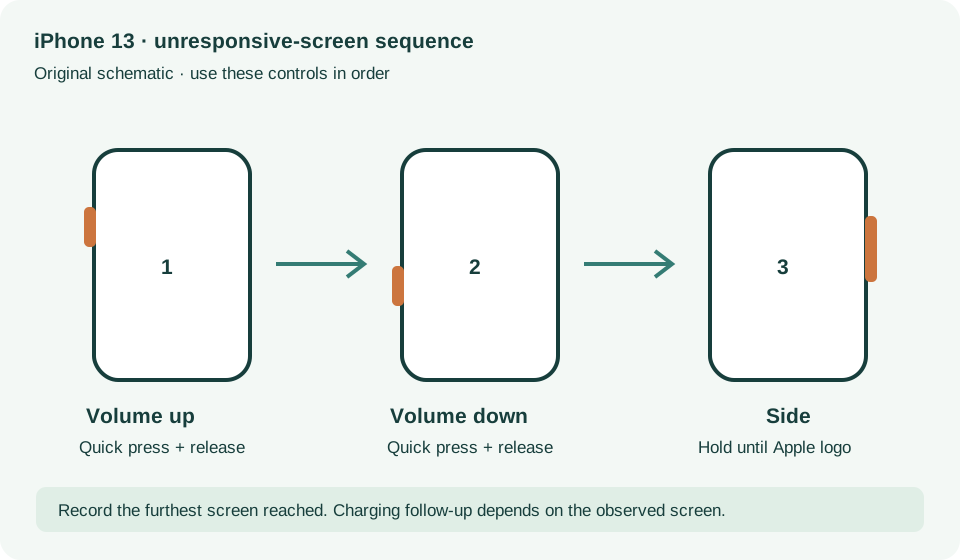
Force your iPhone with Face ID to restart · Checked 2026-10-13
iPhone 13 button sequence and black-screen charge intervals
Reference only. Bounded original paraphrase and original schematics; no copied support images or pages.
If your device will not charge, steps 1–8 · Checked 2026-10-13
External power checks and two 30-minute charging intervals
Reference only. Bounded original paraphrase and original schematics; no copied support images or pages.
Handling; Repairing; Battery; Charging · Checked 2026-10-13
Stop use for suspected damage and use trained battery service
Reference only. Bounded original paraphrase and original schematics; no copied support images or pages.
Find the model name / iPhone 13 · Checked 2026-10-04
Model confirmation
Reference only. Original paraphrase; no copied images or manual pages.
External Buttons and Connectors; Power and Battery · Checked 2026-10-13
Lightning, physical controls and wireless charging applicability
Reference only. Bounded original paraphrase and original schematics; no copied support images or pages.
Get ready; Bring in; Get back from service · Checked 2026-10-13
Backup, OS-specific service readiness, credential privacy and returned-device data
Reference only. Bounded original paraphrase and original schematics; no copied support images or pages.
Original preparation workflow based on the linked documents. No hands-on device repair testing is claimed.