Wired charging: cable, adapter and outlet
Open task Identify which external charging condition changes the response before arranging service.
Device evidence task · iPhone 13
Track safe drying and determine whether a warning follows one accessory or every dry connection.
Planning estimate for recording observations; excludes charging, backups, drying and service. Not a measured repair time.
Enable JavaScript to record observations. The complete preparation guide is available below.
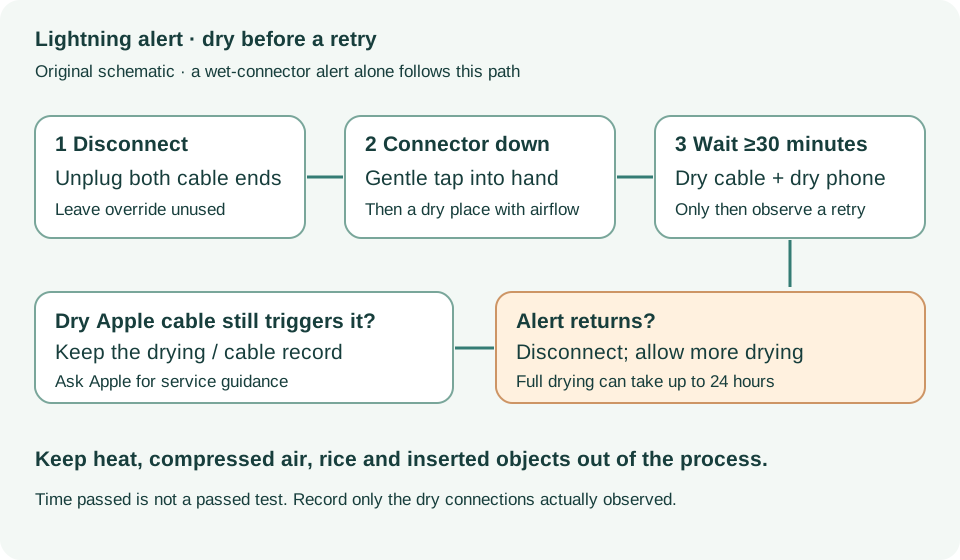
Unplug both cable ends. Leave emergency charging override unused for these checks. Record whether the warning began after known moisture or only with one accessory.
Source: Liquid detection on iPhone · If your iPhone or accessory is wet
Gently tap the phone against your hand with Lightning facing down, then leave it in airflow. Use no heat, compressed air, rice or objects inside the connector.
Source: Liquid detection on iPhone · Dry your iPhone; things not to do
Wait at least 30 minutes before a dry-cable check. If the warning returns, disconnect again and let drying continue.
Source: Liquid detection on iPhone · Try again after at least 30 minutes
Complete drying can take up to 24 hours. Record the later result only when you actually tried a dry connection; time elapsed alone is not a passing result.
Source: Liquid detection on iPhone · Liquid can remain under pins; up to 24 hours
A warning confined to one dry accessory should be taken to its manufacturer. Repeated warnings with a dry Apple cable need Apple service guidance.
Source: Liquid detection on iPhone · If your iPhone and accessory are not wet
If your iPhone or accessory is wet; If your iPhone and accessory are not wet · Checked 2026-10-13
Drying intervals and accessory-specific persistent alerts
Reference only. Bounded original paraphrase and original schematics; no copied support images or pages.
Handling; Repairing; Battery; Charging · Checked 2026-10-13
Stop use for suspected damage and use trained battery service
Reference only. Bounded original paraphrase and original schematics; no copied support images or pages.
Find the model name / iPhone 13 · Checked 2026-10-04
Model confirmation
Reference only. Original paraphrase; no copied images or manual pages.
External Buttons and Connectors; Power and Battery · Checked 2026-10-13
Lightning, physical controls and wireless charging applicability
Reference only. Bounded original paraphrase and original schematics; no copied support images or pages.
Get ready; Bring in; Get back from service · Checked 2026-10-13
Backup, OS-specific service readiness, credential privacy and returned-device data
Reference only. Bounded original paraphrase and original schematics; no copied support images or pages.
Original preparation workflow based on the linked documents. No hands-on device repair testing is claimed.