Wired charging: cable, adapter and outlet
Open task Identify which external charging condition changes the response before arranging service.
Device evidence task · iPhone 13
Record warning, workload and recovery after cooling without deliberately reproducing overheating.
Planning estimate for recording observations; excludes charging, backups, drying and service. Not a measured repair time.
Enable JavaScript to record observations. The complete preparation guide is available below.
Record what appeared: Charging On Hold, dimmed screen, a temperature warning or an unexpected shutdown. Warmth alone and an onscreen warning are different observations.
Source: iPhone temperature management · Device gets too warm; Charging On Hold; warning screen
Select the activity that was already occurring, such as charging, navigation, camera use or setup. Do not recreate heavy load to generate another warning.
Source: iPhone temperature management · Conditions that can cause warmth
For a temperature warning, turn the phone off, move away from sun or heat and let it cool. Stop active use while cooling.
Source: iPhone temperature management · If a temperature warning screen appears
After it has cooled, observe ordinary use. Record whether brightness or charging returns; there is no fixed cooling countdown that proves safety.
Source: iPhone temperature management · Normal behavior resumes after cooling
If the same warning returns in normal cooler conditions, save the recurrence and contact Apple. A charging pause near a high charge level alone does not identify battery failure.
Source: If your iPhone will not charge · Device stopped charging at 80 percent
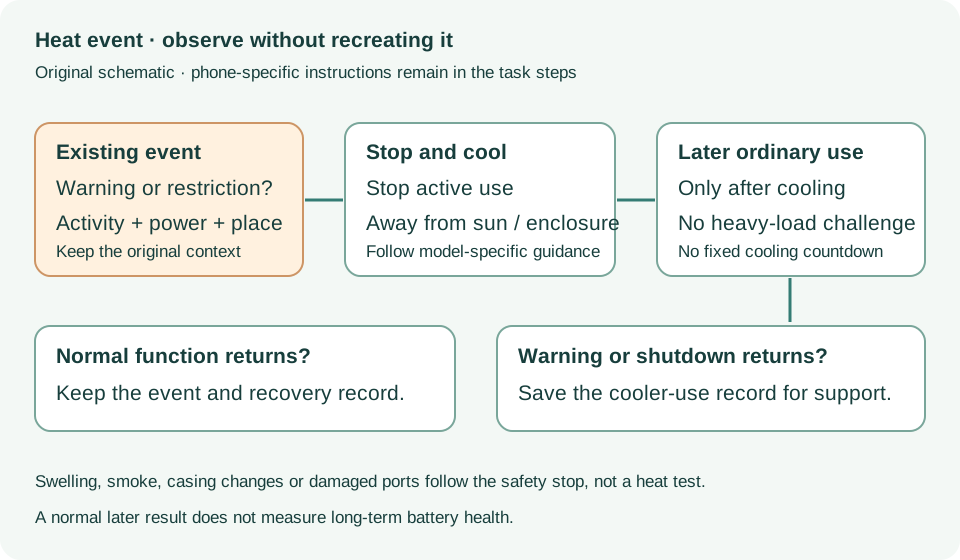
Device gets too warm; Charging On Hold; Temperature warning · Checked 2026-10-13
Cooling and temperature-related charging/display restrictions
Reference only. Bounded original paraphrase and original schematics; no copied support images or pages.
If your device will not charge, steps 1–8 · Checked 2026-10-13
External power checks and two 30-minute charging intervals
Reference only. Bounded original paraphrase and original schematics; no copied support images or pages.
Handling; Repairing; Battery; Charging · Checked 2026-10-13
Stop use for suspected damage and use trained battery service
Reference only. Bounded original paraphrase and original schematics; no copied support images or pages.
Find the model name / iPhone 13 · Checked 2026-10-04
Model confirmation
Reference only. Original paraphrase; no copied images or manual pages.
External Buttons and Connectors; Power and Battery · Checked 2026-10-13
Lightning, physical controls and wireless charging applicability
Reference only. Bounded original paraphrase and original schematics; no copied support images or pages.
Get ready; Bring in; Get back from service · Checked 2026-10-13
Backup, OS-specific service readiness, credential privacy and returned-device data
Reference only. Bounded original paraphrase and original schematics; no copied support images or pages.
Temperature; How phone protects itself; Too hot · Checked 2026-10-13
Cool-down response and recurring shutdown escalation
Reference only. Bounded original paraphrase and original schematics; no copied support images or pages.
Original preparation workflow based on the linked documents. No hands-on device repair testing is claimed.