Wired charging: cable, adapter and outlet
Open task Identify which external charging condition changes the response before arranging service.
Device evidence task · iPhone 13
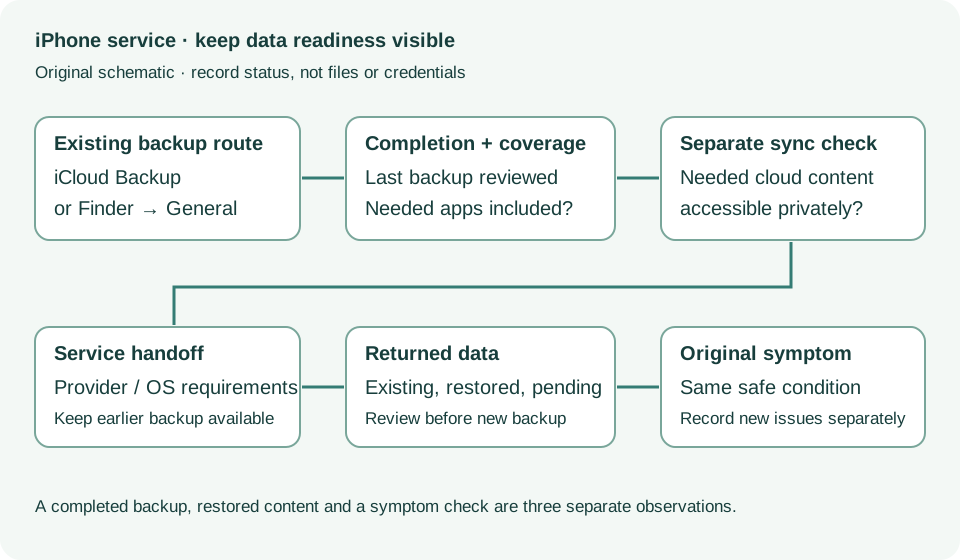
Check the returned phone against the original service concern while keeping the pre-service backup available.
Planning estimate for recording observations; excludes charging, backups, drying and service. Not a measured repair time.
Enable JavaScript to record observations. The complete preparation guide is available below.
Review the provider’s stated work and whether the phone was erased or replaced. Ask about any unfinished preparation or follow-up before leaving the handoff.
Source: Prepare iPhone for a service appointment · When you get your iPhone back from service
Check whether the phone opens normally and required data is available privately. An erased phone needs Apple’s restore guidance; do not erase again from this task.
Source: Prepare iPhone for a service appointment · Return from service: erased device and restoring backup
Keep the earlier backup while reviewing restored and synced content. If setup as new is shown but you intended to restore, ask Apple before starting new backups that could replace the earlier iCloud backup.
Source: Prepare iPhone for a service appointment · Set up as new then restore later: backup overwrite caution
Recheck only the original complaint under the same safe condition: dry direct charging, an ordinary touch control or local ringtone as applicable. Use the corresponding comparison task for detailed steps.
Source: If your iPhone will not charge; Screen not working on iPhone; No sound or distorted iPhone speaker · Charging checks; intermittent touch; ringtone comparison
Record data availability, the original symptom and any new problem separately. Return persistent or new problems to the provider with this comparison and service paperwork.
Source: Prepare iPhone for a service appointment · When you get your device back from service
Get ready; Bring in; Get back from service · Checked 2026-10-13
Backup, OS-specific service readiness, credential privacy and returned-device data
Reference only. Bounded original paraphrase and original schematics; no copied support images or pages.
Back up using iCloud; Manage iCloud storage; Back up using your Mac · Checked 2026-10-13
Backup completion, coverage and local encryption
Reference only. Bounded original paraphrase and original schematics; no copied support images or pages.
If your screen is too sensitive or responds intermittently · Checked 2026-10-13
Dry screen, restart and accessory/cover comparisons
Reference only. Bounded original paraphrase and original schematics; no copied support images or pages.
Troubleshoot your speaker, steps 1–7 · Checked 2026-10-13
Silent switch, Focus, speaker openings, ringtone and call comparisons
Reference only. Bounded original paraphrase and original schematics; no copied support images or pages.
If your device will not charge, steps 1–8 · Checked 2026-10-13
External power checks and two 30-minute charging intervals
Reference only. Bounded original paraphrase and original schematics; no copied support images or pages.
Handling; Repairing; Battery; Charging · Checked 2026-10-13
Stop use for suspected damage and use trained battery service
Reference only. Bounded original paraphrase and original schematics; no copied support images or pages.
Find the model name / iPhone 13 · Checked 2026-10-04
Model confirmation
Reference only. Original paraphrase; no copied images or manual pages.
External Buttons and Connectors; Power and Battery · Checked 2026-10-13
Lightning, physical controls and wireless charging applicability
Reference only. Bounded original paraphrase and original schematics; no copied support images or pages.
Original preparation workflow based on the linked documents. No hands-on device repair testing is claimed.