Wired charging: cable, adapter and outlet
Open task Identify which external charging condition changes the response before arranging service.
Device evidence task · iPhone 13
Verify the backup and service preparation that can actually be completed on this iPhone.
Planning estimate for recording observations; excludes charging, backups, drying and service. Not a measured repair time.
Enable JavaScript to record observations. The complete preparation guide is available below.
Choose your existing backup route. For a Mac, select iPhone in Finder → General, choose the local backup option and Back Up Now. Keep any encryption password privately.
Source: Back up iPhone · Back up iPhone using your Mac
Review the reported backup completion and included apps. For iCloud, use Settings → your name → iCloud → iCloud Backup; distinguish backup contents from separately synced data.
Source: Back up iPhone · Back up using iCloud; Manage iCloud storage
Check that the iCloud features you use have finished syncing. Record completion status only, without account names or file contents.
Source: Prepare iPhone for a service appointment · Get ready: backup and iCloud sync
Read the service page for the installed iOS. Find My or repair-readiness instructions depend on OS. Follow the owner-only instructions at handoff; ask the provider if the named option is absent.
Source: Prepare iPhone for a service appointment · Get ready: OS-dependent Find My / Ready for Repair or Trade-In
Check appointment, affected accessories, proof of purchase and identification requirements privately. Remain present if asked to authenticate during software support. Never disclose account passwords or device passcodes.
Source: Prepare iPhone for a service appointment · When you bring in; credential warning
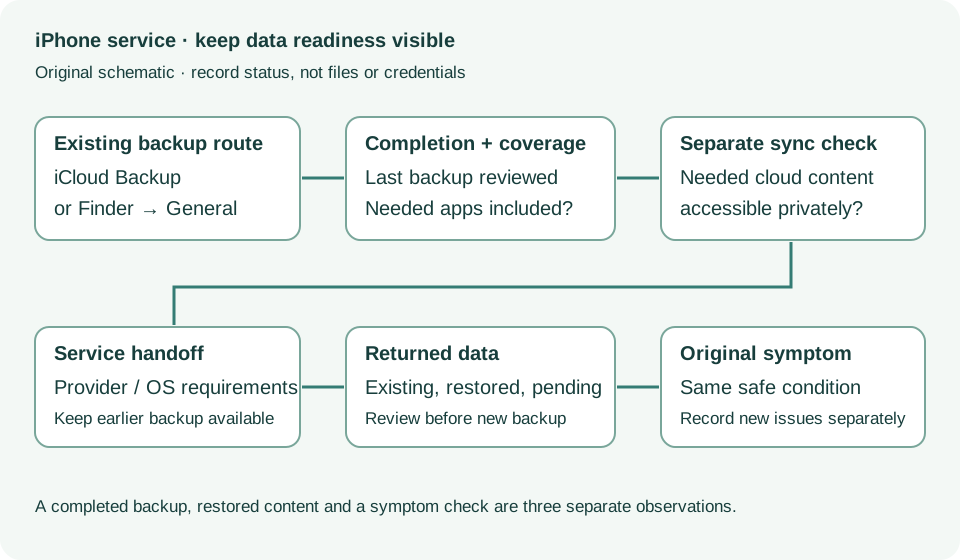
Get ready; Bring in; Get back from service · Checked 2026-10-13
Backup, OS-specific service readiness, credential privacy and returned-device data
Reference only. Bounded original paraphrase and original schematics; no copied support images or pages.
Back up using iCloud; Manage iCloud storage; Back up using your Mac · Checked 2026-10-13
Backup completion, coverage and local encryption
Reference only. Bounded original paraphrase and original schematics; no copied support images or pages.
Handling; Repairing; Battery; Charging · Checked 2026-10-13
Stop use for suspected damage and use trained battery service
Reference only. Bounded original paraphrase and original schematics; no copied support images or pages.
Find the model name / iPhone 13 · Checked 2026-10-04
Model confirmation
Reference only. Original paraphrase; no copied images or manual pages.
External Buttons and Connectors; Power and Battery · Checked 2026-10-13
Lightning, physical controls and wireless charging applicability
Reference only. Bounded original paraphrase and original schematics; no copied support images or pages.
Original preparation workflow based on the linked documents. No hands-on device repair testing is claimed.