Apple Diagnostics with the right macOS branch
Open task Capture an Apple silicon diagnostic result and identify exactly which tests ran.
Device evidence task · MacBook Air M1
Compare one repeatable symptom across verified safe mode and normal startup.
Planning estimate for recording observations; excludes charging, backups, drying and service. Not a measured repair time.
Enable JavaScript to record observations. The complete preparation guide is available below.
Pick one harmless local action that exposes the symptom, such as opening the same document. Record its normal-startup result before changing mode. Skip an action that would risk unsaved data.
Source: Start up your Mac in safe mode · Purpose of safe mode; original comparison worksheet
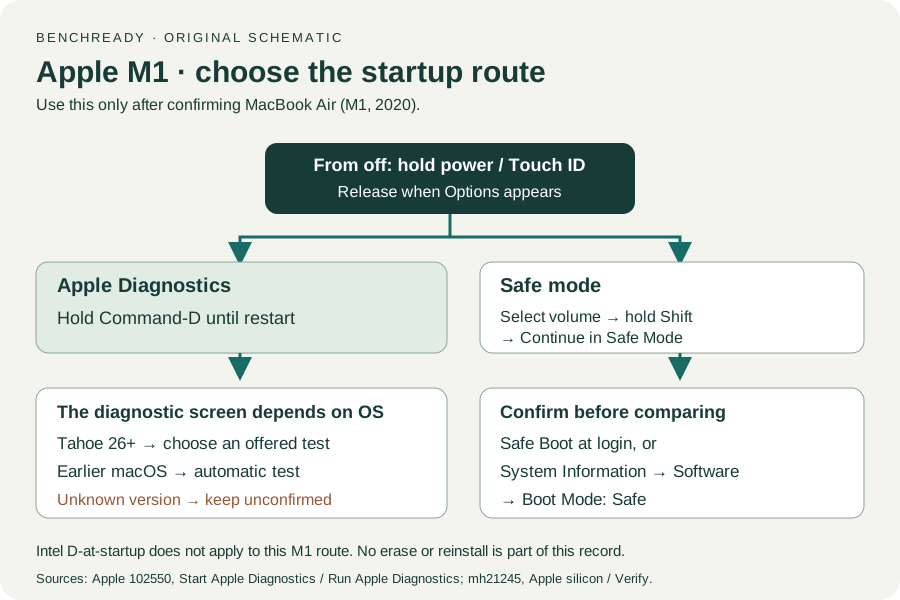
Shut down completely. Hold power until startup options load, select the startup volume, then hold Shift and choose Continue in Safe Mode. This is the Apple silicon sequence.
Source: Start up your Mac in safe mode · Start up your Mac with Apple silicon in safe mode
Sign in using your own credential. Confirm Safe Boot at the login screen or inspect System Information → Software → Boot Mode. Record safe mode only when confirmed.
Source: Start up your Mac in safe mode · Verify your Mac started up in safe mode
Perform the same available action once. If the feature cannot be tested in safe mode, mark that condition Not applicable and retain the limitation instead of declaring success.
Source: Start up your Mac in safe mode · Safe mode purpose; original same-action comparison
Restart normally and compare that action again. Retain all three results for support; a difference suggests a startup-software lead without naming a particular app.
Source: Start up your Mac in safe mode · Safe mode purpose / Boot Mode Normal; original comparison worksheet
Apple silicon / Verify safe mode · Checked 2026-10-13
M1 power, startup volume, Shift + Continue in Safe Mode and Boot Mode verification
Reference only. Original paraphrase and observation worksheets; no copied images or manual pages.
Handling / Built-in battery / Charging · Checked 2026-10-13
General damaged-equipment and moisture safety only; M1-specific connections are sourced from mac-spec
Reference only. Original paraphrase and observation worksheets; no copied images or manual pages.
Find model / MacBook Air M1 2020 · Checked 2026-10-04
Model and chip confirmation
Reference only. Original paraphrase; no copied images or manual pages.
Charging and Expansion / Display Support · Checked 2026-10-13
Two USB-C Thunderbolt/USB4 ports and one native external display up to 6K at 60 Hz
Reference only. Original paraphrase and observation worksheets; no copied images or manual pages.
Prepare / Apple silicon / Run Apple Diagnostics / Results · Checked 2026-10-13
M1 Options then Command-D; Tahoe 26+ selected tests versus earlier automatic testing; preserve reference code
Reference only. Original paraphrase and observation worksheets; no copied images or manual pages.
Original preparation workflow based on the linked documents. No hands-on device repair testing is claimed.