Battery drain: usage and recurring conditions
Open task Build a comparable app-use record before attributing short runtime to the battery.
Device evidence task · Pixel 7
Compare the Pixel 7 wireless path using its supported charger class and a steady unobstructed position.
Planning estimate for recording observations; excludes charging, backups, drying and service. Not a measured repair time.
Enable JavaScript to record observations. The complete preparation guide is available below.
Confirm the charger for Pixel 7 using the Pixel 9a-and-earlier section of Google’s charging page: a compatible Qi 1.x charger or Pixel Stand. Do not apply later-model Qi2 instructions by appearance.
Source: Charge your Pixel phone · Wireless charging on Pixel 9a and earlier
Use the charger’s appropriate adapter and a working outlet. Put it on a stable surface away from interfering metal or magnets.
Source: Charge your Pixel phone · Set up wireless charger
If charging is slow or unsteady, safely remove thick or metallic cases and ring holders. Position the phone as the charger maker directs.
Source: Charge your Pixel phone · Best wireless charging experience: cases
Observe with the phone resting still and unused. Record the charging indication; keep a warm-device pause separate from a cool-pad failure.
Source: Charge your Pixel phone · Do not move phone; Keep it cool
Compare a dry direct USB-C connection separately if available. A wired success narrows the power-path evidence without proving which wireless component failed.
Source: Pixel will not charge or turn on · Confirm charger/cable; charging indication
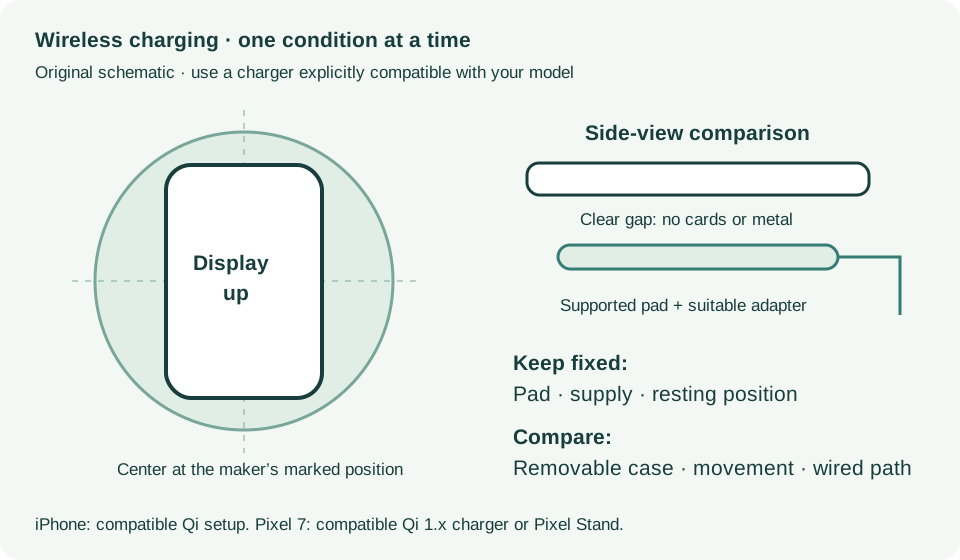
Wireless charging on Pixel 9a and earlier; Charging tips · Checked 2026-10-13
Pixel 7 Qi 1.x or compatible Pixel Stand and unobstructed charging
Reference only. Bounded original paraphrase and original schematics; no copied support images or pages.
Charger/cable/outlet; Charge for 10 minutes; Troubleshoot screen · Checked 2026-10-13
Power-path comparison, low-charge wait and 35-second screen check
Reference only. Bounded original paraphrase and original schematics; no copied support images or pages.
Safety warnings; Repair and service; Charging · Checked 2026-10-13
Model-specific damaged-device and charging safety
Reference only. Bounded original paraphrase and original schematics; no copied support images or pages.
Learn how it works; Access; Exit · Checked 2026-10-13
Android 14 December 2023+, 2 GB, backups, possible reset and credential privacy
Reference only. Bounded original paraphrase and original schematics; no copied support images or pages.
Charge wirelessly; Learn more · Checked 2026-10-13
Qi setup, centering, cases, metal and USB precedence
Reference only. Bounded original paraphrase and original schematics; no copied support images or pages.
Original preparation workflow based on the linked documents. No hands-on device repair testing is claimed.