Camera shutter, permissions and app preview
Open task Separate a covered lens, denied access and an app-specific black camera preview.
Device evidence task · ThinkPad T14 Gen 2 Intel
Verify the fitted connection before separating cable/link problems from network access.
Planning estimate for recording observations; excludes charging, backups, drying and service. Not a measured repair time.
Enable JavaScript to record observations. The complete preparation guide is available below.
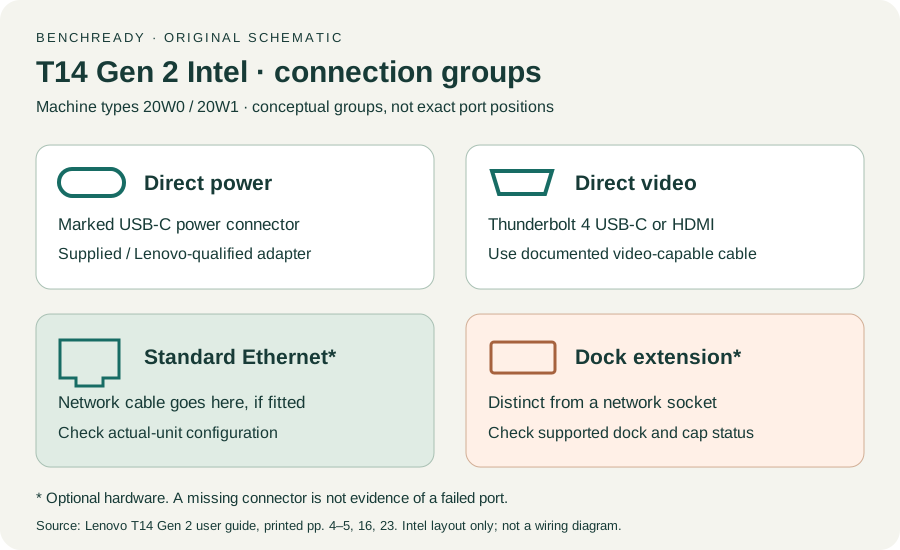
Inspect the actual Intel unit. The guide marks standard Ethernet and Ethernet extension/docking hardware as configuration-dependent; an extension connector is not a standard network socket.
Source: ThinkPad T14 Gen 2 user guide · Printed pp. 4–5 → Intel optional connectors and extension connector notes
Use a fitted standard Ethernet socket or a documented compatible dock. If the unit has a capped or absent extension connector, follow the guide’s docking compatibility warning.
Source: ThinkPad T14 Gen 2 user guide · Printed pp. 4–5 → extension connector; p. 9 → wired Ethernet
Connect an undamaged cable to a permitted known-working port. Record Windows wired-network status before testing internet access.
Source: ThinkPad T14 Gen 2 user guide · Printed p. 9 → Connect to wired Ethernet; original link/access distinction
If permitted, change only the Ethernet cable while retaining the same port and laptop path. Alternatively compare a permitted device on the original cable/port; identify which comparison was done.
Source: ThinkPad T14 Gen 2 user guide · Printed pp. 65–66 → reproducible support facts; original controlled network comparison
A wired link without internet may require network authorization or administrator review. A shared failure across devices goes to the network owner; do not change managed addressing or network policy here.
Source: ThinkPad T14 Gen 2 user guide · Printed p. 9 → network connection; pp. 65–66 → support; original routing
Printed pp. 1–5, 9–14, 16–19, 23–25, 27–33, 62, 65–67 · Checked 2026-10-13
Existing local official PDF/text reviewed for Intel layout, optional hardware, controls, Vantage, power and support
Reference only. Original paraphrase and observation worksheets; no copied images or manual pages.
Original preparation workflow based on the linked documents. No hands-on device repair testing is claimed.