Vantage scan scope and result handoff
Open task Keep an official hardware-scan result tied to the component and symptom actually checked.
Device evidence task · ThinkPad T14 Gen 2 Intel
Compare the direct Lenovo power path before a dock, adapter or battery decision.
Planning estimate for recording observations; excludes charging, backups, drying and service. Not a measured repair time.
Enable JavaScript to record observations. The complete preparation guide is available below.
Check the adapter label privately. The guide lists 45 W or 65 W depending on configuration; confirm the supplied or Lenovo-qualified adapter for this unit.
Source: ThinkPad T14 Gen 2 user guide · Printed p. 23 → Use ac power
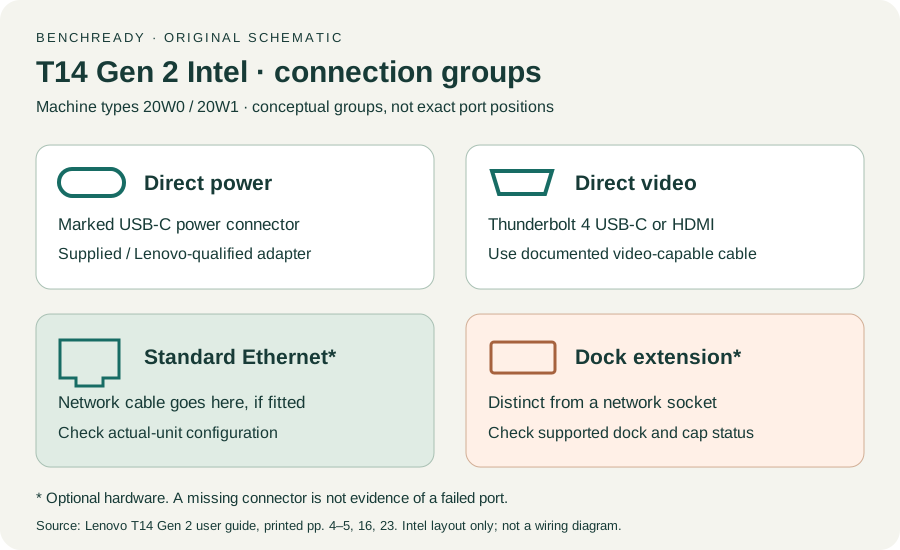
Disconnect the dock and connect the safe adapter to the marked USB-C power connector. Keep the other accessories and workload constant for this direct baseline.
Source: ThinkPad T14 Gen 2 user guide · Printed p. 4 → Intel side view; p. 23 → Charge the computer
Open Windows Settings → System for battery status and use installed Lenovo Vantage for more detail. Record AC recognition separately from charging progress.
Source: ThinkPad T14 Gen 2 user guide · Printed p. 23 → Check the battery status; p. 19 → Vantage
If a second known-compatible Lenovo-qualified adapter is available, compare it on the same outlet and connector. A missing spare stays Not tested; do not measure live contacts or open the adapter.
Source: ThinkPad T14 Gen 2 user guide · Printed p. 23 → qualified adapters; original controlled comparison
If external power is recognized but charging pauses, retain the displayed battery state and workload. The manual describes charge-management behavior; one pause cannot locate battery damage.
Source: ThinkPad T14 Gen 2 user guide · Printed p. 24 → charging notes; original status worksheet
Bring the affected adapter and laptop to Lenovo if direct AC remains unrecognized. A working direct result with a failing dock path is a dock-support lead.
Source: ThinkPad T14 Gen 2 user guide · Printed pp. 65–67 → support information; original path comparison
Printed pp. 1–5, 9–14, 16–19, 23–25, 27–33, 62, 65–67 · Checked 2026-10-13
Existing local official PDF/text reviewed for Intel layout, optional hardware, controls, Vantage, power and support
Reference only. Original paraphrase and observation worksheets; no copied images or manual pages.
Original preparation workflow based on the linked documents. No hands-on device repair testing is claimed.