ThinkPad USB-C power recognition and charging
Open task Compare the direct Lenovo power path before a dock, adapter or battery decision.
Device evidence task · ThinkPad T14 Gen 2 Intel
Keep an official hardware-scan result tied to the component and symptom actually checked.
Planning estimate for recording observations; excludes charging, backups, drying and service. Not a measured repair time.
Enable JavaScript to record observations. The complete preparation guide is available below.
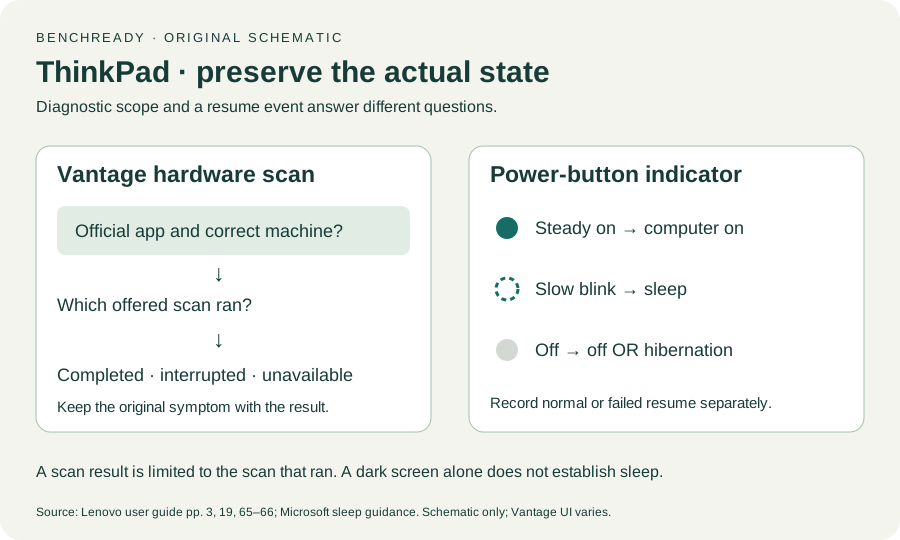
Check Vantage device information against T14 Gen 2 Intel and machine type 20W0/20W1. Keep the full serial number out of this record.
Source: ThinkPad T14 Gen 2 user guide · Printed p. 19 → Vantage; pp. 65–66 → system information
Search Windows for Vantage and open the installed official app. Its functions and labels vary by model and app version; record when hardware scanning is absent.
Source: ThinkPad T14 Gen 2 user guide · Printed p. 19 → Vantage features and notes
Save work, review the offered scan’s requirements and select the relevant available hardware test. Record whether this was an offered general scan or a particular component test.
Source: ThinkPad T14 Gen 2 user guide · Printed p. 19 → scan hardware; original scope record
Follow the displayed scan instructions. Keep scan execution separate from driver or firmware updates; an update prompt is a different decision for Lenovo/IT.
Source: ThinkPad T14 Gen 2 user guide · Printed p. 19 → separate scan and update features; scoped worksheet
Record complete, interrupted or unavailable. Retain a result identifier privately for Lenovo and note whether the original symptom remains after the scan.
Source: ThinkPad T14 Gen 2 user guide · Printed pp. 65–66 → error codes, reproducibility and support facts
Printed pp. 1–5, 9–14, 16–19, 23–25, 27–33, 62, 65–67 · Checked 2026-10-13
Existing local official PDF/text reviewed for Intel layout, optional hardware, controls, Vantage, power and support
Reference only. Original paraphrase and observation worksheets; no copied images or manual pages.
Windows 11 / Windows 10 → Sleep · Checked 2026-10-13
Sleep command, configured lid/power behavior and manufacturer-dependent resume
Reference only. Original paraphrase and observation worksheets; no copied images or manual pages.
Original preparation workflow based on the linked documents. No hands-on device repair testing is claimed.