Battery drain: usage and recurring conditions
Open task Build a comparable app-use record before attributing short runtime to the battery.
Device evidence task · Pixel 7
Separate device backup, synced content and app-specific gaps before a service handoff.
Planning estimate for recording observations; excludes charging, backups, drying and service. Not a measured repair time.
Enable JavaScript to record observations. The complete preparation guide is available below.
Find Backup in the installed Settings app. Current Google guidance uses Google services → Backup; older labels can differ. Review Backup details for included apps and data.
Source: Back up or restore data on Pixel · Automatically back up: review data and apps
Check the reported last backup date/completion locally. If using Google Drive on your own browser, Storage → Backups lists device backups and modification times. Record status only.
Source: Back up or restore data on Pixel · Check last backup date from browser
Check needed photos, videos and contacts in their respective services privately. Google distinguishes these synced items from device backup; one completed device backup does not verify them.
Source: Back up or restore data on Pixel · Introduction: photos, videos and contacts separate
Review any app data or local-only files outside the shown coverage. Use that app’s own backup/export support or an existing safe copy method; mark unverified categories rather than assuming inclusion.
Source: Back up or restore data on Pixel · Check which data and apps are included
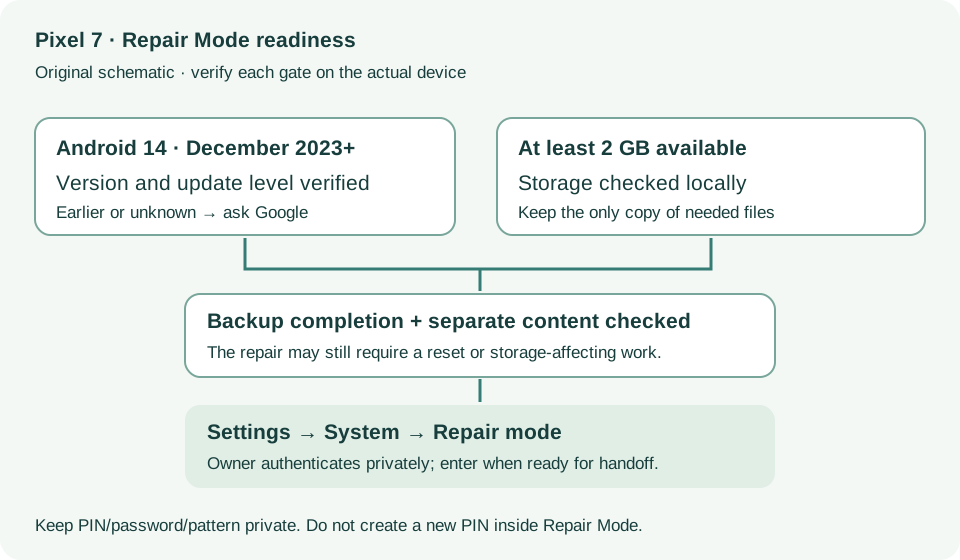
Tell the provider which coverage gaps remain. Back up before every repair even when using Repair Mode, because the repair may require a reset or storage-affecting work.
Source: Use Pixel Repair Mode · Backup before every service; data deletion possibility
Automatically back up; Backup details; Last backup date · Checked 2026-10-13
Device backup versus separately synced photos/video/contacts
Reference only. Bounded original paraphrase and original schematics; no copied support images or pages.
Learn how it works; Access; Exit · Checked 2026-10-13
Android 14 December 2023+, 2 GB, backups, possible reset and credential privacy
Reference only. Bounded original paraphrase and original schematics; no copied support images or pages.
Safety warnings; Repair and service; Charging · Checked 2026-10-13
Model-specific damaged-device and charging safety
Reference only. Bounded original paraphrase and original schematics; no copied support images or pages.
Original preparation workflow based on the linked documents. No hands-on device repair testing is claimed.