ThinkPad USB-C power recognition and charging
Open task Compare the direct Lenovo power path before a dock, adapter or battery decision.
Device evidence task · ThinkPad T14 Gen 2 Intel
Combine verified backup coverage, private recovery access and reproducible complaint evidence.
Planning estimate for recording observations; excludes charging, backups, drying and service. Not a measured repair time.
Enable JavaScript to record observations. The complete preparation guide is available below.
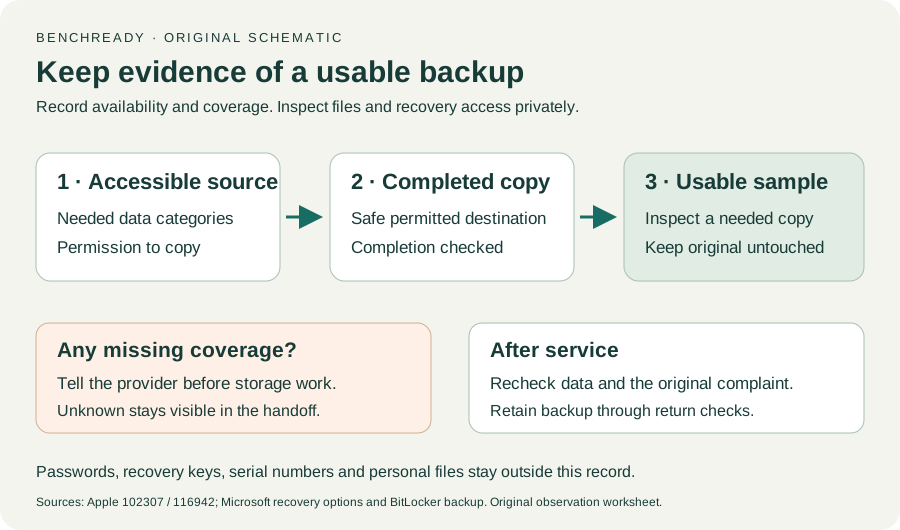
Back up needed accessible files through the existing permitted method. Check completion and inspect a representative copy locally without replacing the original.
Source: Recovery options in Windows · Before recovery → back up data; original sample verification
If BitLocker/device encryption is enabled, verify that the recovery key is backed up and accessible to the owner or IT through the official account or approved storage. Record availability only.
Source: Back up your BitLocker recovery key · Why recovery keys matter / How to back up
Keep recovery keys, PINs, passwords and full serial numbers outside this report. A hardware/security change may require recovery access; do not start a storage change merely to test that access.
Source: Back up your BitLocker recovery key · Recovery access and backup storage; conservative non-destructive check
Collect machine type, Windows version, continuous/intermittent pattern, recent changes, affected app category and any scan result. Keep personal logs and exact identifiers for direct provider communication.
Source: ThinkPad T14 Gen 2 user guide · Printed pp. 65–66 → Before you contact Lenovo
Use Lenovo’s official support route to confirm service scope, data-handling expectations and affected accessories to bring. If backup or recovery access is missing, resolve that before agreeing to storage-affecting work.
Source: ThinkPad T14 Gen 2 user guide; Recovery options in Windows · Printed pp. 65–67 → support; backup before recovery
Printed pp. 1–5, 9–14, 16–19, 23–25, 27–33, 62, 65–67 · Checked 2026-10-13
Existing local official PDF/text reviewed for Intel layout, optional hardware, controls, Vantage, power and support
Reference only. Original paraphrase and observation worksheets; no copied images or manual pages.
Recovery key purpose / Backup methods · Checked 2026-10-13
Owner/IT recovery availability before hardware service; no key input
Reference only. Original paraphrase and observation worksheets; no copied images or manual pages.
Before recovery: back up data · Checked 2026-10-13
Backup before data-affecting work; original non-destructive sample check
Reference only. Original paraphrase and observation worksheets; no copied images or manual pages.
Time Machine / iCloud / Other backup methods · Checked 2026-10-13
Backup methods and data recovery purpose; original sample/coverage worksheet
Reference only. Original paraphrase and observation worksheets; no copied images or manual pages.
Make a backup / Arrange service / Check settings · Checked 2026-10-13
Data may be erased or storage replaced; actual-OS service requirements; original post-service acceptance worksheet
Reference only. Original paraphrase and observation worksheets; no copied images or manual pages.
Original preparation workflow based on the linked documents. No hands-on device repair testing is claimed.